Credit Management Portal - Designing an analytical portal for credit management

Timeline

Q3 2025 - Q1 2026

Team

  • Jasper Kense
  • 4 engineers
  • 1 project manager

Role

  • Project owner
  • product designer
  • maintainer

Skills

  • Product design
  • Data visualization
  • Systems thinking
  • Figma
  • User research

References

The credit management portal for coeo was a design problem about complexity. Clients needed a place where they could monitor portfolios, understand financial performance, and take action when needed. The existing tools already contained a lot of data, but not enough structure. Users could access information, yet still struggle to answer simple questions: what changed, what matters, and what should I do next?

I led the product design of the new portal with a focus on analytical clarity. The goal was not to make the interface look more modern. It was to turn a dense financial environment into something more legible, actionable, and maintainable. That meant working across user research, information architecture, data visualization, workflow design, and close collaboration with engineering.

The core challenge

Analytical products often fail in the same way: they expose a lot of data but do very little to help users interpret it. That was the central issue here. Existing dashboards showed too much at once, with weak hierarchy and limited guidance. Users had access to metrics, but not always to understanding.

That became especially visible across user types. Portfolio managers needed control and scale. Analysts needed filtering, comparisons, and export logic. Smaller clients needed a simpler way to understand portfolio health without being buried in detail. Internal support teams also needed a version of the truth they could quickly read and explain.

The portal had to support all of those needs without collapsing into either of two bad extremes: overly simplified reporting for power users, or an overloaded control panel for everyone else.

My role

I owned the product direction and design of the portal. That included defining the UX principles, structuring the information architecture, designing the main analytical flows, and working closely with engineers during implementation and maintenance.

Figma design for a single file view in the financial portal

My role sat between interface design and systems thinking. I was not just deciding how charts should look. I was deciding how users move from overview to diagnosis to action, how different layers of information should relate to each other, and how the product could stay understandable as more data and features were added over time.

Research and framing

The first phase of the project focused on understanding how different users made decisions with portfolio data. I looked at the product less as a dashboard and more as a decision environment.

A few patterns emerged quickly. Users did not want more raw data. They wanted help identifying what was relevant. They also did not all need the same interface. Some users worked at a high level and only occasionally drilled into individual cases. Others spent much more time comparing trends, filtering segments, and exporting data for further analysis.

This made progressive disclosure a central design principle from the start. The portal needed to begin with a clear summary of portfolio state, then let users move deeper only when they needed more precision. That sounds obvious, but in analytical products it is often where things break down. Teams try to satisfy every user at once, and the result is an interface with too many signals competing for attention.

Designing the information model

The most important design decision was to organize the portal around user intent rather than around data sources or internal system structure.

Instead of asking users to navigate by technical categories, I designed the portal around a small number of product areas:

  • overview and monitoring
  • portfolio management
  • analytics and reporting
  • settings and configuration

That gave the product a clearer shape. The overview helped users assess the state of their portfolio quickly. Portfolio management supported operational work on accounts and bulk actions. Analytics and reporting handled deeper investigation and export scenarios. Settings made room for personalization without polluting primary workflows.

This structure also helped engineering. It created cleaner boundaries between feature areas and made it easier to reason about what belonged where as the product expanded.

From dashboards to decision-making

A core principle throughout the project was that the interface should prioritize insight over display. I did not want the main dashboard to feel like a collection of charts. It needed to function as a reading of the portfolio.

That meant designing the default experience around a small number of important signals, with strong visual hierarchy and clear pathways into deeper analysis. The landing view had to answer a few questions immediately:

  • what is the current state of the portfolio
  • what changed recently
  • where are the risks or opportunities
  • what can I do next

That framing changed how metrics were presented. Rather than treating every number as equally important, I designed the dashboard to create a sequence of attention. Summary metrics came first. Trends and anomalies followed. Detailed breakdowns and filters appeared only once users stepped into a more investigative mode.

This was a product design decision, but it also had a systems quality to it. The UI needed to reflect the mental model of the work.

Designing for multiple levels of expertise

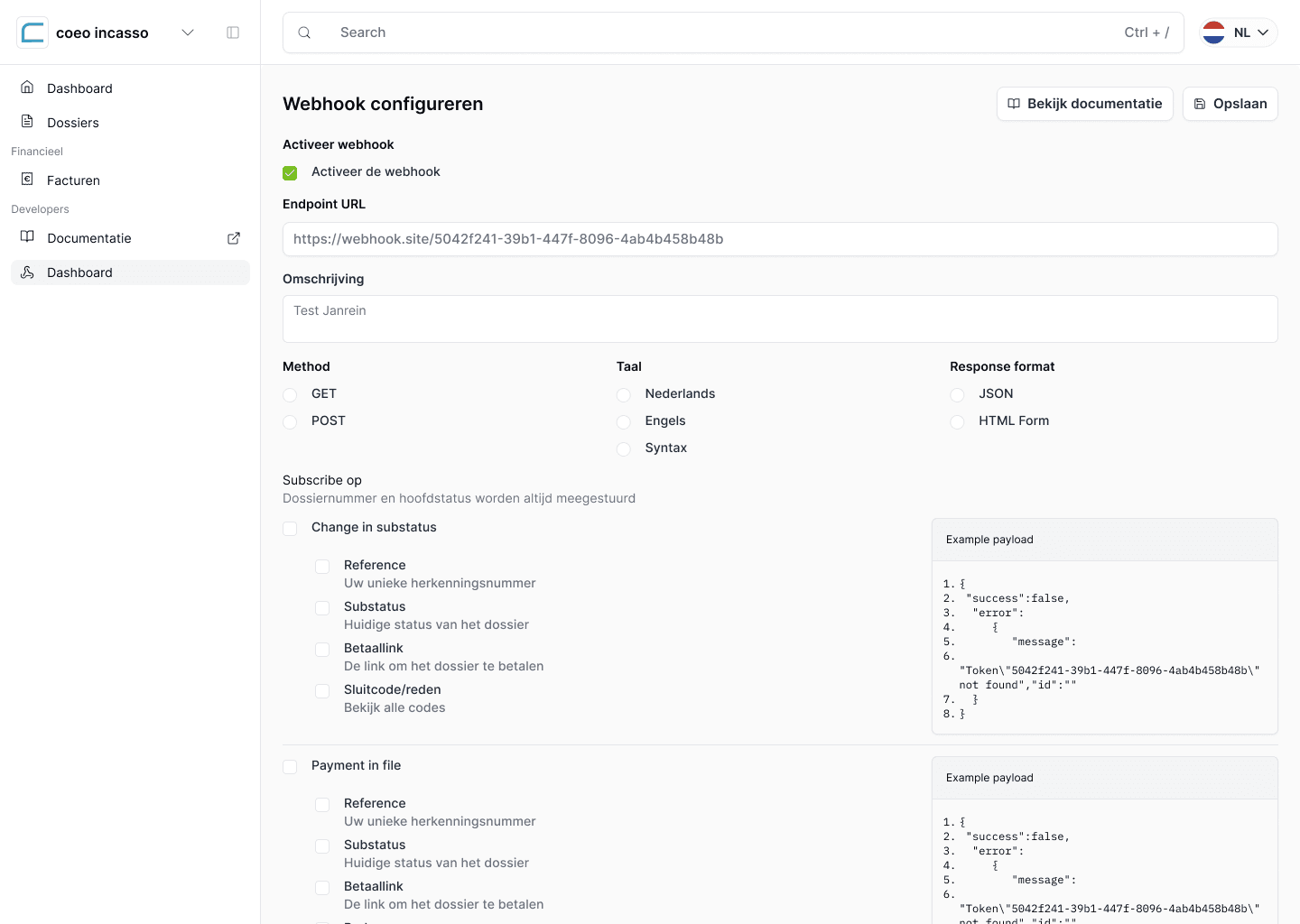
Webhooks are a specialized part of the application meant to help developers access their data

One of the harder parts of the project was supporting both expert and non-expert users in the same product. Analytical tools often assume a fairly high level of data fluency, but that was not always realistic here. Some clients needed depth. Others needed orientation.

The solution was not to create separate products. It was to create an interface that scaled. High-level views stayed readable and focused. Drill-down layers allowed more advanced users to inspect segments, compare states, and move into more detailed reporting. This let the product feel approachable at the top level without becoming shallow underneath.

Customizability also played a role, but I treated it carefully. Too much configurability can push design complexity back onto the user. Instead of making everything configurable, I focused on allowing users to adapt views around the metrics and perspectives most relevant to their role, while keeping the default experience coherent.

Data visualization as interface design

A large part of the work was in how data got translated into visual form. In financial products, poor visualization creates both usability problems and trust problems. If people cannot tell what they are looking at quickly, they stop trusting the interface.

Graph view in the financial portal lowers the level of intensity for low-level users like C-levels

I treated charts, tables, filters, and comparisons as interaction design, not just presentation. The important question was never just which chart type to use. It was how a user would interpret it, compare it with something else, and move from that interpretation into action.

Accessibility mattered here too. Analytical interfaces are often designed visually first and only later checked for compliance. I wanted the opposite. Visualizations needed to remain understandable through hierarchy, labeling, contrast, structure, and assistive support. That meant avoiding charts that looked impressive but collapsed under real use, especially when clarity and scanability were more important than density.

Technical thinking behind the design

Although my role on this project was primarily product and design, the work was closely tied to technical realities. Analytical portals only feel good when the underlying system supports fast filtering, responsive views, stable data states, and clear relationships between summary and detail.

I worked closely with engineers around the shape of the product so the interface could hold up under real conditions. Performance was a design issue here, not just an engineering concern. If dashboards felt slow, if filters took too long to apply, or if views did not update predictably, the product would immediately feel less trustworthy.

The same was true for responsive behavior and real-time data. Users needed access across devices, but that did not mean shrinking a desktop dashboard onto a phone. It meant rethinking how much information appears at once, what remains primary on smaller screens, and how actions stay usable when space is limited.

Security and privacy also shaped the experience. Because the portal dealt with sensitive financial information, the interface had to communicate control and reliability without becoming intimidating or overly technical. Good analytical products do not just expose data safely. They also make that safety legible to users.

Maintenance and product stewardship

One part of the role I value in this project is reflected in the word maintainer. Designing the portal was not a one-off exercise. The product needed ongoing care as requirements evolved, new needs appeared, and implementation details surfaced over time.

That kind of stewardship matters in analytical products. Once teams start relying on a portal operationally, small design issues become recurring friction. Maintaining coherence over time means protecting the system, not just the screens. It means keeping interaction patterns consistent, making sure new features fit the product model, and avoiding the slow drift into clutter that many enterprise tools suffer from.

Outcome

The result was a credit management portal designed to help clients read their portfolios more clearly and work with them more effectively. The product brought more structure to analytical workflows, improved the clarity of high-level reporting, and created a better path from insight to action.

What I consider most successful about the project is not any one feature. It is that the portal became more interpretable. Users could start with a clear overview, move into details when necessary, and use the product with a better sense of orientation. That is a meaningful shift in a domain where complexity tends to accumulate quickly.

What I learned

This project reinforced how much analytical design depends on restraint. It is easy to add another metric, another chart, another filter. It is much harder to create a product that helps users focus.

It also sharpened my belief that data visualization is only one part of analytical UX. The real work is in structuring attention, supporting interpretation, and making interaction paths feel obvious even when the underlying domain is complex.

More broadly, the portal was a good example of the kind of work I like most: product design that sits close to systems design. The value came from shaping the model behind the interface, not just the interface itself.

Why this project matters

This project is important in my portfolio because it shows another side of my design work. Unlike more consumer-facing flows, this was a dense B2B environment with real complexity, multiple user types, and high expectations around clarity and trust.

It reflects how I approach product design when the challenge is not invention but reduction: making complex systems easier to understand, easier to navigate, and more useful in practice. That is work I find deeply rewarding, and it is where a lot of my design judgment is strongest.

References: coeo